How to Go Live Without Downloading an App
You can go live on your phone without downloading anything or creating an account. Scan a QR code, and it opens a broadcast studio right in your mobile browser. This zero-install path skips app stores entirely, so you can start streaming within seconds of deciding to. LiveSnap.tv does this by routing your mobile camera feed through WebRTC directly in Chrome or Safari, no binary download, ever.
This guide covers the exact mechanics of no-app live streaming, from permissions to queue management, so you know what's happening technically when you skip the app store. Browser-based broadcasting has matured past its experimental phase, but it runs under different constraints than native software. Knowing those differences up front saves you frustration on your first stream.
Why Browser-Based Streaming Replaces App Installs
Going live from a browser isn't a novelty move. It's a response to years of accumulated friction in app-based broadcasting. Modern mobile browsers now handle real-time encoding tasks that used to demand a dedicated native app, which makes the download step optional for casual broadcasters.
Friction costs of app downloads and account creation
Every extra step between impulse and action loses you broadcasters. App store navigation, download, install, and permission setup together cost 30 to 60 seconds, and that's enough friction to cause real drop-off in casual broadcaster conversion. Skip the packaged binary, load the studio as a web page instead, and that attrition disappears.
Account creation is its own abandonment point, and anonymous broadcasting removes it for first-time users. Ask someone for email verification, a password, and a profile before they've even tried broadcasting, and you filter out the curious experimenters, the ones who might stick around if you let them in immediately.
WebRTC capabilities on modern mobile browsers
In 2026, modern mobile browsers support the getUserMedia API and WebRTC peer connections natively. That means real-time video encoding and transmission with no plugin install. Your phone's camera and microphone are available to web apps with roughly the same latency as native apps, as long as the network holds steady. The underlying WebRTC streaming mechanics handle codec negotiation, bitrate adaptation, and packet loss recovery automatically, inside the browser runtime.
Chrome and Safari have converged on compatible implementations, which is why cross-platform no-app live streaming now works reliably for public broadcasts. Earlier generations of browser streaming had patchy API support and weak performance on iOS. Current WebKit and Blink engines process media streams efficiently enough for real-time audience viewing.
How to Start a No-App Live Stream via QR Code
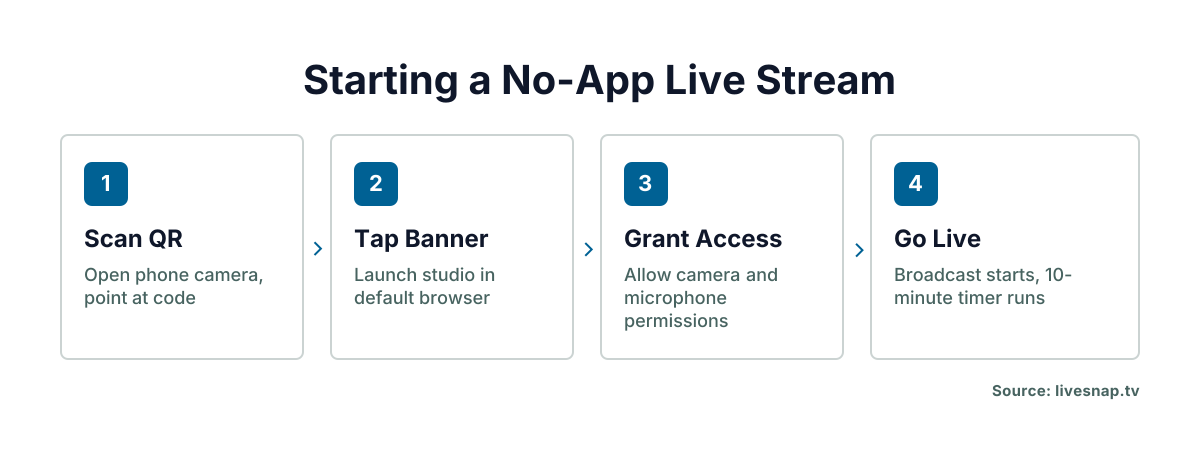
Scanning a code is the fastest way to stream from your phone's browser because it skips URL typing and bookmark management entirely. The QR code live stream entry point at LiveSnap.tv encodes the full studio URL with session parameters built in, so one scan replaces manual navigation and setup.
Scanning the code to open the browser studio
- Open your phone's native camera app and point it at the LiveSnap.tv QR code, wherever it's displayed or printed.
- Tap the notification banner to launch the mobile broadcast studio in your default browser.
- Wait for the studio interface to fully load before you try to enable camera or mic.
The whole sequence takes under five seconds on current hardware and a decent connection. That speed is why scanning a QR code to broadcast remains the go-to onboarding method for spontaneous streaming, downloading software would kill the momentum.
Granting camera and microphone permissions securely
Right after the studio loads, your browser prompts you for camera and microphone access. Grant it only to the livesnap.tv domain. Modern browsers remember this choice for future visits, so you won't see the prompt every time. These permissions live at the browser level, not the OS level, revoke them through browser settings, not your phone's privacy menu.
Deny either permission and broadcasting stops dead; the studio can't capture media without your explicit consent. Accidentally denied something? Reload the page to trigger the prompt again, or go adjust site permissions in your browser's privacy settings.
Understanding the 10-minute slot and public queue system
Unregistered users get a timed 10-minute slot in a public queue. Registered users build reputation scores through viewer ratings, and those scores cut wait times and unlock longer airtime. The rotation keeps access fair across shared infrastructure without needing the moderation resources most anonymous platforms don't have. Your slot starts the moment you hit the front of the queue, and a countdown timer stays visible on screen for the whole broadcast.
When the 10 minutes run out, the stream ends automatically. You go back to viewer status no matter how big your audience was or how well it was going. That hard limit stops any one unverified user from hogging broadcast resources, and it keeps the queue moving for everyone waiting to stream from phone without an app.
Streaming from Phone Browser Without an Account
Anonymous broadcasting works because each browser session counts as a temporary identity rather than a persistent credential. You can go live without downloading anything or creating an account, but that convenience trades off against features that need verified identity and accumulated trust.
Anonymous broadcasting mechanics and limitations
Session-based broadcasting gives you a temporary identifier tied to your browser, not a permanent username. Viewers see an anonymous broadcaster, no profile history, no follower count, no reputation score on screen. That protects your privacy for one-off experimental streams, but it also means viewers can't find you again later unless you hand out contact info during the broadcast itself.
Chat and moderation tools work fine for anonymous broadcasters during their active slot. What you don't get: persistent community ties, or a notification when someone you interacted with goes live again, since there's no account linking one session to the next.
When to register for reputation scores and longer airtime
Registering makes sense once you know you want to do this regularly, not just try it once. An account links your browser sessions into one persistent identity, which accumulates viewer ratings across streams and builds a reputation score. The queue algorithm uses that score to prioritize your placement, higher reputation means shorter waits at peak hours and slots longer than the standard 10-minute anonymous allocation.
Make that call after a few successful anonymous streams, once you know the format fits your content and your schedule. Register too early and you're carrying account overhead for a format you might abandon after one or two tries.
Technical Requirements for Instant Mobile Broadcasting
Browser streaming has its own technical floor, and missing it means degraded quality, not a graceful fallback. You need a stable upload connection that can hold at least 2 Mbps consistently. WebRTC drops quality when bandwidth fluctuates rather than buffering the way pre-recorded video does.
Your device needs a current version of Chrome, Safari, Firefox, or Edge, with JavaScript on and hardware acceleration active. Older browsers have incomplete getUserMedia support and can fail to open the camera even when you've granted permission. Browser-based encoding also drains the battery faster than an optimized native app does, so plug in for anything approaching the 10-minute limit, or carry a battery pack.
Is browser-based live streaming reliable next to native apps in 2026? For streams under 15 minutes on a stable connection, yes, though native apps still win on thermal management and background resilience over longer broadcasts. According to LiveSnap.tv, that reliability gap narrows every year as browsers optimize their media pipelines, but dedicated hardware access still has the edge for marathon sessions.
Managing Viewer Interaction Without Platform Lock-In
Viewer interaction in no-app live streaming happens through chat embedded right in the browser studio, not a separate messaging app. That keeps attention on the broadcast window instead of splitting it across tabs competing for screen space on a phone.
Chat messages last only as long as your broadcast slot and vanish when the stream ends, unless a viewer screenshots them. That's different from platform-native chat histories that stay searchable forever. It cuts harassment risk, but it also means you can't reference a past conversation in a future stream. Moderation here runs on real-time human judgment rather than automated keyword filters, since anonymous sessions don't carry the persistent identity data that ban systems need to work.
Browser Live Streaming vs Traditional Apps: Key Differences
How browser streaming differs from traditional apps matters for setting expectations around performance, features, and reach. Native apps keep background processes alive through interruptions like phone calls or low-battery warnings. Browser streams end when the tab loses focus or the device sleeps. That difference means browser broadcasting asks more of you in terms of active attention and multitasking discipline.
Feature parity isn't there yet, despite how close the protocols have gotten. Screen sharing, multi-camera switching, and custom overlays work reliably in native apps but need workarounds, or just aren't there, in browser studios. Audience discovery differs too: browser streams don't show up in app store listings or the recommendation algorithms that drive organic viewers to native broadcasters.
The tradeoff favors speed over polish. Browser streaming wins when getting on air fast matters more than production value. Native apps make more sense for creators chasing consistent quality and audience growth over spontaneous access.
Troubleshooting Common No-Install Stream Issues
A black screen after you grant camera permission usually means another app already has exclusive hold of the camera. Close other tabs, camera apps, and video conferencing software, then reload the LiveSnap.tv studio to free up the hardware lock. Audio feedback loops happen when your device speaker plays back your own transmitted audio and the noise escalates for everyone watching; headphones or muted speaker output fix this.
A queue position that won't update usually means stale session state cached in your browser. Clear site data for livesnap.tv, or open the studio in a private browsing window to force a fresh queue assignment. Mid-stream connection drops are typically a WiFi handoff failure as you move between access points, so stay on cellular data or a fixed WiFi connection rather than roaming during an active broadcast.
A permission prompt that never shows up points to browser-level blocking, not a site problem. Check your browser's site settings for livesnap.tv and make sure camera and microphone are set to allow, not ask or block. Some corporate and school networks block getUserMedia calls at the proxy level, which makes no-app live streaming impossible on a managed device no matter how your local browser is set up.
Frequently Asked Questions
Can I go live on YouTube or Twitch without downloading their apps?
YouTube and Twitch require their official apps or authenticated browser sessions linked to registered accounts for live broadcasting. LiveSnap.tv offers true zero-install streaming without any account, but streams appear only on its own public queue rather than external platforms. Use platform-native tools when your goal is building audience on YouTube or Twitch specifically.
Where can I go live for free without signing up?
LiveSnap.tv provides free 10-minute broadcast slots to unregistered users who scan the QR code to access the browser studio. No payment, email address, or account creation is required to start streaming anonymously. Extended airtime and reduced queue wait times require registration and earned reputation scores.
What is the easiest way to livestream from my phone right now?
Scanning the LiveSnap.tv QR code with your phone camera opens the broadcast studio instantly without downloads or signups. This method beats app installation for speed since you can be live within seconds of deciding to broadcast. The tradeoff is a 10-minute time limit for anonymous users versus unlimited streaming with native apps.
Why does my browser stream look worse than app streams?
Browser-based encoding lacks access to device-specific hardware optimizations that native apps use for video compression and thermal management. WebRTC adapts bitrate dynamically based on available bandwidth, which can produce lower resolution during network fluctuations. Quality improves on stable connections with strong upload speeds, but native apps still hold an advantage in sustained high-bitrate encoding.