Stream Video Without Creating an Account: Step-by-Step

Most major streaming platforms force you to hand over personal data before you can broadcast a single frame of video. You can stream video without creating an account on LiveSnap.tv by scanning a QR code that opens your phone's camera in the browser. No app store, no registration form. You test content or share a moment instantly, and your identity never touches the broadcast.
Why Stream Video Without Creating an Account?
Going live anonymously is usually a practical call about speed and privacy, not just a preference for secrecy. Skip mandatory registration and you skip the email verification, the password setup, the dashboard tutorial, all the steps that usually stand between you and going live.
Privacy Benefits of Anonymous Live Streaming
Data minimization matters when you're broadcasting experimental content or sharing an unfiltered moment in public. Anonymous live streaming means no persistent profile links your real identity to a temporary broadcast. There's no long-term data trail, no unwanted association with a stream you made months ago. Your phone's camera activates through a session token that expires when the slot ends, so there's no searchable archive tied to a username.
Speed vs. Reputation Trade-offs
Guest broadcasters get immediacy but give up the benefits that come with a verified presence on the platform. An account-free video stream gets you online in seconds, but it also puts you at the back of the public queue, with no priority based on viewer history or community standing. Registered users build reputation scores through viewer ratings. Those scores cut queue wait times directly and unlock broadcast durations longer than the standard guest limit.
How to Start a Quick Live Stream, No Login Required
The whole process takes under thirty seconds from scan to active transmission, because the heavy lifting happens server-side. You don't configure encoding settings, pick bitrate presets, or manage API keys to get a signal out to viewers watching in real time.
Scan QR Code to Broadcast Instantly
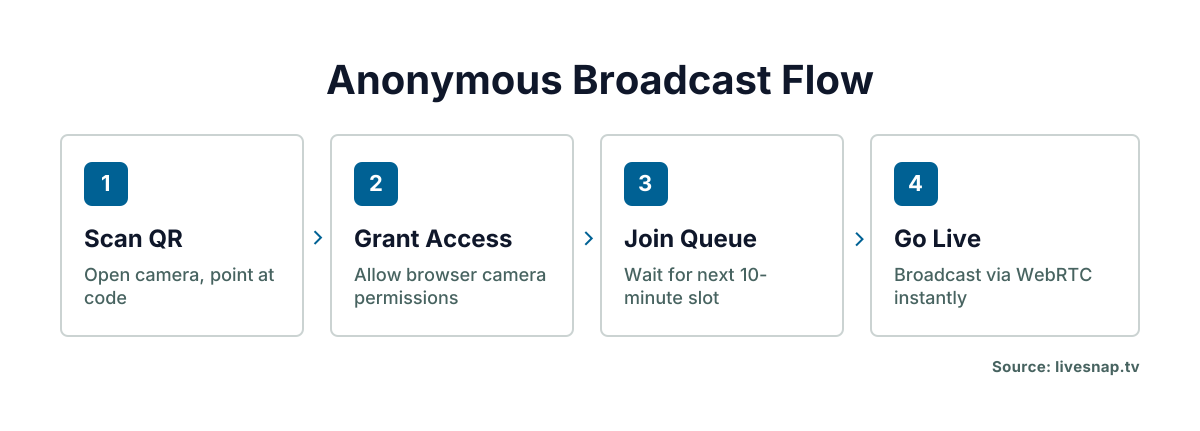
LiveSnap.tv lets you scan a QR code and get straight into your phone's camera through the browser, no app store, no registration. Point your device at the code on the site, grant camera permissions when prompted, and your feed joins the next open slot in the rotation. This works for anyone who wants to go live without downloading an app, with none of the storage overhead that comes with native software.
Understanding 10-Minute Queue Slots
Unregistered broadcasters get a fixed 10-minute slot in a public queue. No identity check required, just a fair spot in line. The system cycles through waiting guests automatically, giving each person a defined window before rotating to the next in line. That keeps any one anonymous user from hogging bandwidth, and it keeps a steady stream of fresh content coming for viewers.
Technical Requirements for an Account-Free Video Stream
Browser-based WebRTC streaming cuts out the dependency on platform-specific apps. That's what makes an account-free video stream work across devices without eating into real-time latency. Your hardware doesn't need to be high-end, but your connection does need to clear a minimum threshold to hold a stable peer-to-peer transmission path.
WebRTC Browser Compatibility
Modern mobile browsers handle the encoding and packetization that live video needs, no plugins or extensions required. Chrome, Safari, and Firefox on Android and iOS all support the WebRTC standards involved, though your browser should be reasonably current for the best codec support. Older browsers can fail to complete the secure handshake needed to establish the media stream.
Mobile Network and Bitrate Basics
Stable uploads need at least 2 Mbps of sustained upstream bandwidth to hold acceptable video quality through your slot. Wi-Fi tends to give you steadier throughput than cellular. If you're stuck on mobile data, stay somewhere your signal holds above three bars for the whole broadcast. Packet loss above 3% causes visible artifacting no matter what your nominal speed says, so run a quick network test before you join the queue.
Anonymous Live Streaming Limitations and Workarounds
Guest broadcasting trades persistence for accessibility, and that means living with constraints registered users don't face. The limits are there by design, to balance open access with keeping the platform running, but knowing them helps you plan a better session.
Queue Wait Times for Guests
Peak hours push guest wait times up as more people request a broadcast slot at once. Without a reputation score to move you up, you're stuck with first-come-first-served during busy periods. Planning your QR code live stream for off-peak windows cuts the idle time and improves your odds of getting a slot fast.
When to Create an Account for Longer Airtime
Ten minutes is fine for testing or a quick update, but it falls short for interviews, tutorials, or anything longer. Creating an account starts to pay off once you've found a content format that works and want to build some audience recognition across sessions. Verified profiles also get chat moderation tools and stream archiving, features guest broadcasters don't have.
Viewer Experience: Watching Without Signing In
Anyone can watch a public stream through a direct link, no authentication, no signup. Viewers see the same real-time feed whether they're logged in or not, and engagement features like rating buttons work the same for anonymous watchers. That openness lowers the barrier for new audiences discovering content through a shared link or an embedded player.
Do viewers need accounts to watch streams from unregistered broadcasters?
No. Watching takes zero credentials and works identically for guests and registered users. The player loads the WebRTC stream directly in the browser, and ratings from anonymous viewers count toward the broadcaster's reputation score exactly like ratings from logged-in ones.
Comparing No-Signup Streaming Sites in 2026
Browser capabilities have matured, and user patience for signup walls has shrunk. Platforms now compete on cutting friction rather than piling on features, which makes technical architecture the real differentiator for casual broadcasters.
Browser-Based vs. App-Dependent Platforms
Native apps offer deeper OS integration, but they demand storage space, update cycles, and permission grants that plenty of users now resist. Browser-native solutions use standardized APIs that work across operating systems with no install, trading some background functionality for working everywhere. If your goal is spontaneous broadcasting, that trade-off favors the browser model by a wide margin.
LiveSnap.tv Queue Model vs. Traditional Signups
Traditional platforms tie streaming privileges to account age, follower counts, or subscription tiers, which creates a cold-start problem for new creators. LiveSnap.tv vs other streaming apps looks at how queue-based allocation treats every guest equally, regardless of external metrics. That model suits experimentation and ephemeral content better than ecosystems built around creator monetization and long-term audience building.
Next Steps After Your First Guest Broadcast Online
Use your first anonymous streams as low-risk tests: check your lighting, your audio levels, your pacing, before you commit to a permanent presence. Review the viewer ratings from those sessions to see what lands, then think about registering once you have something worth repeating and refining. Go from guest to verified broadcaster on the strength of content that's already proven, not the other way around.
Frequently Asked Questions
How to live stream without signing in?
Scan the QR code on LiveSnap.tv with your phone camera to open the browser-based broadcaster interface. Grant camera permissions when prompted, and your feed enters the public queue for the next available 10-minute slot. No email, password, or app download is required at any point in this process.
Can you really start a live stream without making any account?
Yes, LiveSnap.tv allows completely account-free broadcasting through temporary session tokens generated via QR code scan. Your stream goes live within the queue system without storing personal data or creating a persistent profile. The session expires automatically when your allocated slot ends.
What technical setup is needed to stream video without creating an account from a phone?
You need a smartphone with a modern browser (Chrome, Safari, or Firefox updated in 2025 or later) and at least 2 Mbps sustained upload speed. Camera permissions must be granted when prompted after scanning the QR code. No additional software, plugins, or hardware encoders are necessary.
How does the queue system work for anonymous broadcasters?
Guest broadcasters receive fixed 10-minute slots allocated on a first-come-first-served basis within the public rotation. Wait times vary based on current demand since unregistered users lack reputation-based priority. The system cycles continuously to ensure fair access across all waiting participants.